Features / Share
Share
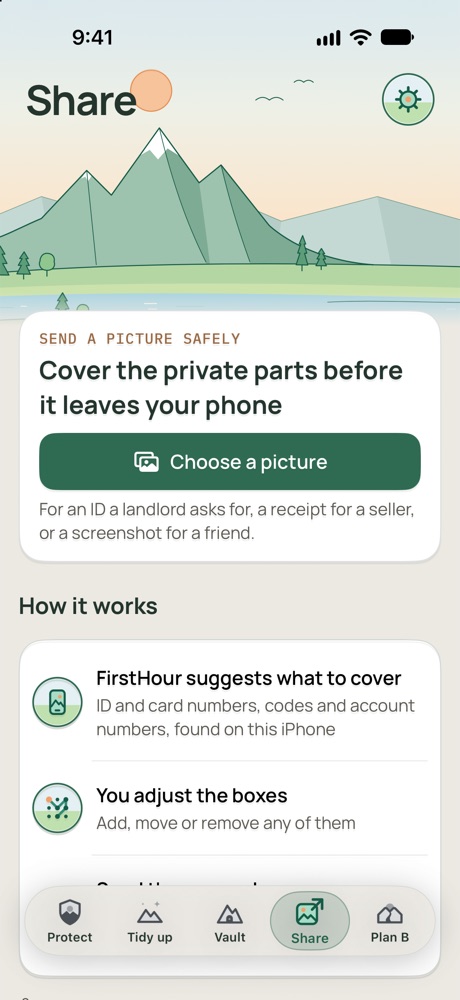
Share the picture, keep the details.
For an ID a landlord asks for, a receipt for a seller, or a screenshot for a friend. Cover the private details before it leaves your phone.
What it does
Suggests what to cover
ID and card numbers, codes and account numbers, and on a card or ID the names and signatures it finds, all found on your iPhone.
You adjust the boxes
Add, move, resize, turn or remove any of them, or cover all the text at once.
Checks again before sending
FirstHour reads the covered copy again and warns you if it can still read a name or number.
Leaves the hidden details out
The copy you send has no location or camera details. Your original picture isn't changed.
How it works
- Choose a picture. Any picture from Photos.
- Check the boxes. Look over the whole picture and adjust what FirstHour suggested.
- Send the covered copy. Pick where it goes from iPhone's share menu.
Good to know
- It only suggests boxes where it found something, and it doesn't find faces. Look over the whole picture before you send it.
- With limited Photos access, add a picture to the ones FirstHour may see first.
- You start a covered copy from FirstHour's Share tab. FirstHour does appear in other apps' share menus, but that sends a file to the Vault, not to Share.