Protect
Gently finds what needs a little care.
Pictures of cards, IDs and codes are easy to forget. FirstHour points them out, keeps them blurred until you're ready, and lets you decide.
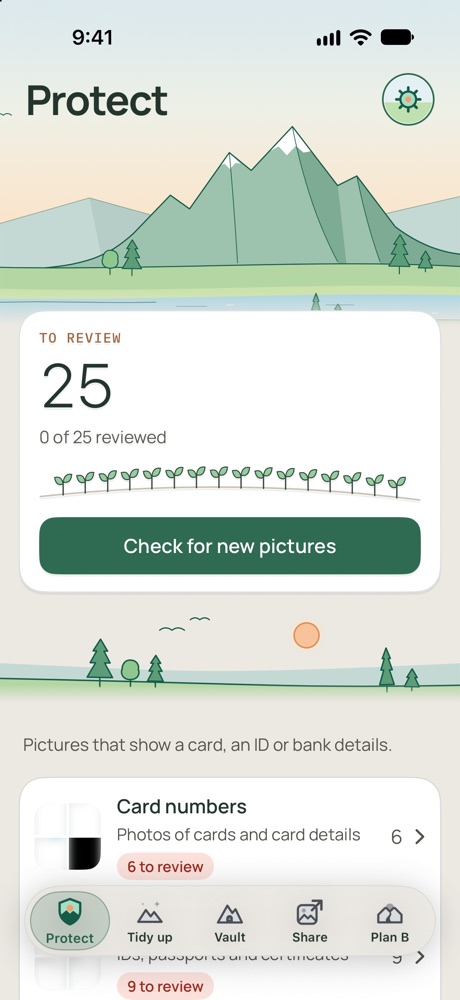
What it looks for
Card numbers
Photos of cards and card details.
IDs and passports
IDs, passports and certificates.
Backup codes
Codes that open an account without your phone.
Crypto recovery phrases
Anyone with these can take the funds.
Bank account numbers
Full account numbers labeled with a bank's name or account wording. E-wallet and masked numbers are left out.
Wi-Fi passwords
QR codes with a network's password inside. It doesn't find a password written or typed in a picture.
Bank or e-wallet mentions
Pictures that name a bank or e-wallet. Often fine to keep.
Old one-time codes
Expired codes. Usually safe to delete.
IDs in other alphabets
FirstHour may miss ID cards written only in alphabets it reads less well, such as Hebrew, Persian, Bangla and Hindi. Passports are usually still found. Please look through your pictures yourself, and check any copy you black out.
What you can do
Stay blurred
Pictures stay blurred until you tap Show, and blur again when you leave FirstHour. You can turn this off.
Review one by one
Swipe left to delete, right to keep, up to hide. You can undo until you tap Apply. After that, unhide a picture from the Hidden album in Photos.
Vault all
Lock a whole group away. Each copy is checked first, then iPhone asks before the originals leave Photos.
Black out
Save a copy with solid black boxes over what was found, and draw your own. Your original doesn't change.
Good to know
- Handwriting, blurry or cropped pictures and raised card digits are often missed.
- "Nothing found" means nothing obvious, not "safe".
- It doesn't check videos, or pictures in your Hidden album.
- It can't see inside other apps, only pictures in Photos.
- US documents have only been tried on made-up examples so far.